You maybe wondering what CI/CD is and wanted a working short example. I’ve given you a very simple example below that you can play with. I hope it helps.
Here’s a clean, simple of CI/CD hands-on example you can run easily.
✅ Prerequisites
- You have a git hub account
- Know some (very little) Python coding for this tutorial
- You understand basic git terminologies and git commands like git init, git add, git commit , git push etc.
- No worries if you don’t know #3, check out these two short videos :
- https://www.youtube.com/watch?v=USjZcfj8yxE
- https://www.youtube.com/watch?v=y-an0v208A0&t=68s
- Once you have git client installed and git account ready continue reading.
✅ What is CI/CD?
CI/CD = Continuous Integration + Continuous Delivery (or Deployment).
It is a devops pipeline that automates:
- Building code
- Testing code
- Deploying it safely and quickly
🔹 Continuous Integration (CI)
Developers merge code into the main branch frequently.
Every commit triggers:
- Build
- Automated tests
- Static security testing (SAST)
- Linting or code checks
Goal: Detect bugs early, prevent “integration hell.”
🔹 Continuous Delivery (CD)
After CI passes, the system:
- Packages the app
- Prepares releases
- Requires a human approval to deploy
Goal: Always be ready to deploy safely.
🔹 Continuous Deployment (CD)
Fully automated deployment to production.
Goal: Every good commit automatically ships.
Simple CI/CD Example for You
Let’s build a tiny pipeline using GitHub Actions.
📌 Step 1 — Create a simple Python app
Create a file:
app.py
def add(a, b):
    return a + b

print(add(2, 3))
📌 Step 2 — Add a unit test
Create:
test_app.py
from app import add

def test_add():
    assert add(2, 3) == 5
📌 Step 3 — Create a CI workflow
You need to do this in your local machine. Lets say your code is in a folder called cicd_tutorial. The .github folder will be in it.
In your local GitHub repo, create:
cicd_tutorial/.github/workflows/ci.yml
Remember to go back to cicd_tutorial do the following:
1. git add .
2. git commit -m “your message”
3. git push
This will trigger the git Actions on your git account
name: Simple CI

on:
  push:
    branches: [ "main" ]
  pull_request:
    branches: [ "main" ]

jobs:
  build-test:
    runs-on: ubuntu-latest

    steps:
      - name: Check out code
        uses: actions/checkout@v3

      - name: Set up Python
        uses: actions/setup-python@v4
        with:
          python-version: '3.10'

      - name: Install dependencies
        run: pip install pytest

      - name: Run tests
        run: pytest -q

  deploy:
    needs: build-test
    runs-on: ubuntu-latest

    steps:
      - name: Deploy to server
        run: echo "Pretend deploying to production..."
What happens now? (CI in action)
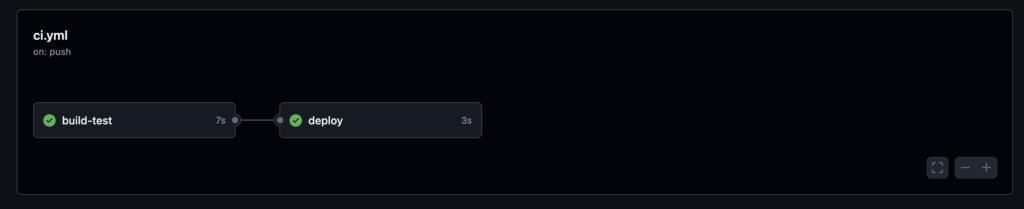
You can look in Github Actions in your Git account, since this is just a tutorial. It mimics a build and deploy steps, please review ci.yml.
Whenever you:
- Push code
- Open a pull request
GitHub will automatically:
- Pull code
- Install Python
- Install pytest
- Run your test
- Show a green ✔ or red ❌
Small CD Example
NOTE *** Add this after your CI job:
Its added for you CI job above, in Step 3. It is only here as reference.
deploy:
  needs: build-test
  runs-on: ubuntu-latest

  steps:
    - name: Deploy to server
      run: echo "Pretend deploying to production..."
This will only run if tests pass.
Visual Summary
Commit → CI (build + test + security checks)
        → CD (optional deploy to production)
What you’ll see in your github/Actions